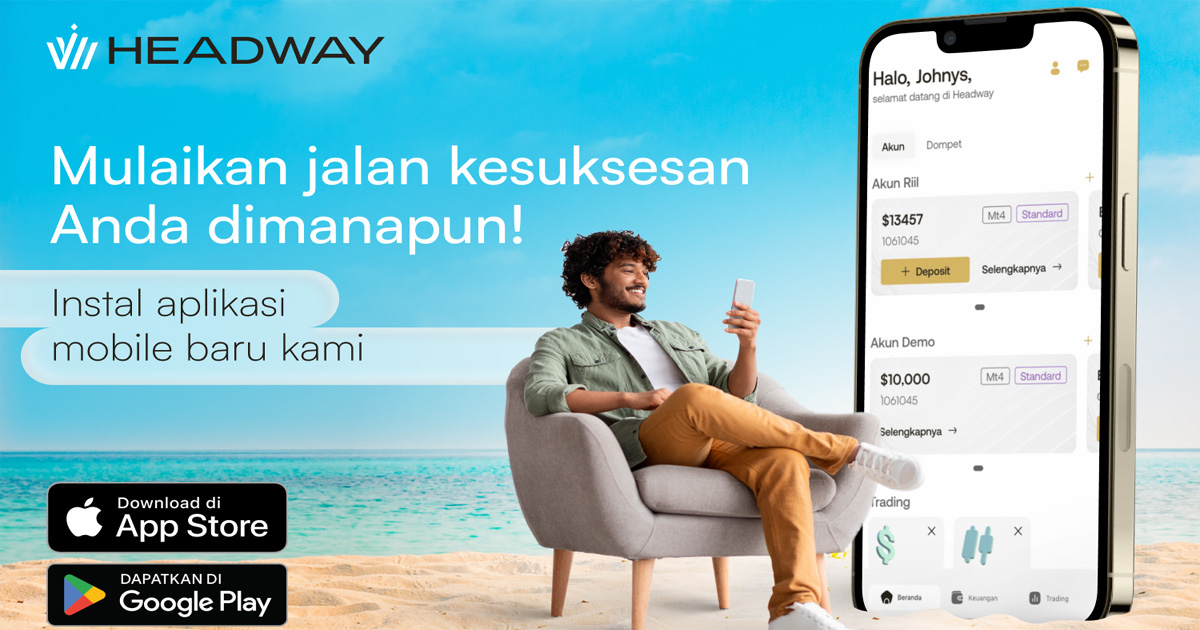
The Headway trading app offers MT4, wallets and 24/7 chat, and Headway covers payment commissions on in-app deposits and withdrawals.
Key facts
- Headway released its new mobile app for trading in June 2023.
- The app is free and available in the App Store and Google Play.
- You can trade on MT4 and manage accounts and wallets in one place.
- Demo and real accounts (Cent, Standard or Pro) are available on MT4.
- Headway compensates all payment system commissions for deposits and withdrawals made in the app.
- Login works with Face ID or Touch ID.
- Customer Care is available in chat around the clock.
Risk warning: trading forex and CFDs is risky, and bonuses and promotions come with conditions.
What the Headway Trading App Offers
Headway has launched a new mobile app for trading. It brings the main tools a trader needs into one place on your phone.
With the app, users can trade on MT4. They can also manage accounts and wallets, move money between accounts, and chat with Customer Care at any time.
All commissions for deposits and withdrawals are compensated by the broker. This is the main reason many traders look at this release.
Quick overview
| Feature | What it means for you |
|---|---|
| Platform | Trade on MT4 from your phone |
| Accounts | Demo and real (Cent, Standard, Pro) |
| Payments | Deposits, withdrawals and internal transfers |
| Payment commissions | Compensated by Headway for deposits and withdrawals in the app |
| Security | Face ID or Touch ID login |
| Support | Customer Care in chat, 24/7 |
High protection, quick access
You can log in with Face ID or Touch ID (fingerprint login). This helps protect your personal data and gives you fast access to the app.
The interface is built to be friendly. New users get a detailed tutorial that guides them through the first steps.
Trading accounts and wallets in one place
Demo and real accounts on MT4 are available in the app. The real account types are Cent, Standard and Pro.
Traders can open and manage these accounts in one place. You can check settings, find your sign-in details for MetaTrader, change passwords, and more.
A demo account is a useful way to learn the app without risking your own money. If you like practice contests, see the Headway Volatility Masters Forex Demo Trading Contest or The Headway Gold vs Oil Forex Demo Trading Contest.
More demo contest guides are also available. You can read the Headway Market Kings Forex Demo Trading Contest Entry Guide, the story of the Headway Fire Ride Demo Trading Contest 2027, or how to win the Headway Gold Rush Forex Trading Demo Contest.
You can also read about the Enter the Headway Broker Forex Demo Trading Contest offer and the Headway Launches Demo Trading Contest with Real Prizes story.
Commission for Deposits and Withdrawals in the Headway Trading App
The Headway trading app also handles payments. Users can make deposits, withdrawals and internal transfers between their accounts.
According to Headway, three taps are enough to resume trading on MetaTrader with new funds.
Headway compensates all payment system commissions for deposits and withdrawals in the app. In simple terms, the payment system's fee is covered by the broker, not by you.
What this means in practice
Many payment systems charge a fee when you move money. In the app, Headway pays these payment system commissions for you. That can make moving money in and out of your account simpler to plan.
Keep in mind that this covers payment system commissions. It is not a promise that every possible cost is removed. Trading costs, such as spreads or swaps, are a separate topic.
What to check before you withdraw
A covered commission does not remove every rule. Before you move money, read the broker's terms for the exact withdrawal conditions.
- Check which payment methods are available in your country.
- Check any minimum or maximum amounts and processing times.
- Check whether a bonus or promotion adds extra withdrawal conditions.
- Check if your bank or e-wallet charges anything on its own side.
These details can change by method and region. The broker's official pages always have the final word.
Customer Care 24/7 in the App
Customer Care is open to all clients around the clock in the chat. You can reach it from every page of the app.
This means you can get support when and where you need it most. That is helpful if a payment or login question comes up outside office hours.
How to Install the Headway Trading App
The app is free to download and install on every device with Android and iOS. Search for the Headway Trading App in the App Store or Google Play.
- Open the App Store (iOS) or Google Play (Android).
- Search for the Headway Trading App and install it.
- Log in or register, and turn on Face ID or Touch ID if you want it.
- Start with a demo account to learn how the app works.
- Open a real account only when you understand the risks.
About Headway
Headway is an international broker. It offers trading with 245 popular instruments and unlimited leverage.
Trading conditions are customized to traders' needs. They include Swap-Free accounts, local trading instruments, micro lots, and a minimum deposit of $1.
Unlimited leverage can increase losses as fast as it increases profits. Use it with care and manage your risk.
Looking at other Headway offers? Read about how Headway Reduces Bitcoin Trading Commissions by 65%. You can also see how to Grow your Trading Balance with Headway 75% Bonus. Always read the terms of any bonus first.
Is the Headway Trading App Right for You?
The Headway trading app may suit you if you want MT4, account management and payments on one mobile screen. Quick biometric login and 24/7 chat are also useful for active traders.
Still, an app is only a tool. It does not lower market risk. Never trade money you cannot afford to lose.
FAQ
When was the Headway trading app released?
Headway released its new mobile app for trading in June 2023. It is available in the App Store and Google Play.
Does Headway charge commission for withdrawals in the app?
Headway says it compensates all payment system commissions for deposits and withdrawals in the app. Check the broker's terms for exact withdrawal conditions and any limits.
Which accounts can I use in the Headway trading app?
You can use demo and real accounts on MT4. The real account types are Cent, Standard and Pro.
Is the Headway trading app free?
Yes. The app is free to download and install on Android and iOS devices.
Press Contacts
Ulyana Markitantova, PR Manager
u.markitantova@hw.site
care@hw.site